




**Note**: This plugin is for Vue 3. [Check out the docs for Vue 2 version](https://github.com/storyblok/storyblok-vue-2).
## 🚀 Usage
Check out the **[Live Demo](https://stackblitz.com/edit/vue-sdk-demo?file=src/main.js&terminal=dev)** on Stackblitz!
> If you are first-time user of the Storyblok, read the [Getting Started](https://www.storyblok.com/docs/guide/getting-started?utm_source=github.com&utm_medium=readme&utm_campaign=storyblok-vue) guide to get a project ready in less than 5 minutes.
### Installation
Install `@storyblok/vue`
```bash
npm install @storyblok/vue
# yarn add @storyblok/vue
```
> ⚠️ This SDK uses the Fetch API under the hood. If your environment doesn't support it, you need to install a polyfill like [isomorphic-fetch](https://github.com/matthew-andrews/isomorphic-fetch). More info on [storyblok-js-client docs](https://github.com/storyblok/storyblok-js-client#fetch-use-polyfill-if-needed---version-5).
Register the plugin on your application (usually in `main.js`), add the `apiPlugin` and add the [access token](https://www.storyblok.com/docs/api/content-delivery#topics/authentication?utm_source=github.com&utm_medium=readme&utm_campaign=storyblok-vue) of your Storyblok space:
```js
import { createApp } from "vue";
import { StoryblokVue, apiPlugin } from "@storyblok/vue";
import App from "./App.vue";
const app = createApp(App);
app.use(StoryblokVue, {
accessToken: "YOUR_ACCESS_TOKEN",
use: [apiPlugin],
});
```
That's it! All the features are enabled for you: the _Api Client_ for interacting with [Storyblok CDN API](https://www.storyblok.com/docs/api/content-delivery#topics/introduction?utm_source=github.com&utm_medium=readme&utm_campaign=storyblok-vue), and _Storyblok Bridge_ for [real-time visual editing experience](https://www.storyblok.com/docs/guide/essentials/visual-editor?utm_source=github.com&utm_medium=readme&utm_campaign=storyblok-vue).
> You can enable/disable some of these features if you don't need them, so you save some KB. Please read the "Features and API" section.
#### From a CDN
Install the file from the CDN and access the methods via `window.storyblokVue`:
```html
```
### Getting started
`@storyblok/vue` does three actions when you initialize it:
- Provides a `storyblokApi` object in your app, which is an instance of [storyblok-js-client](https://github.com/storyblok/storyblok-js-client)
- Loads [Storyblok Bridge](https://www.storyblok.com/docs/Guides/storyblok-latest-js?utm_source=github.com&utm_medium=readme&utm_campaign=storyblok-vue) for real-time visual updates
- Provides a `v-editable` directive to link editable components to the Storyblok Visual Editor
#### Short Form
Load globally the Vue components you want to link to Storyblok in your _main.js_ file:
```js
import Page from "./components/Page.vue";
import Teaser from "./components/Teaser.vue";
app.use(StoryblokVue, {
accessToken: "",
use: [apiPlugin],
});
app.component("Page", Page);
app.component("Teaser", Teaser);
```
Use `useStoryblok` in your pages to fetch Storyblok stories and listen to real-time updates, as well as `StoryblokComponent` to render any component you've loaded before, like in this example:
```html
```
#### Rendering Rich Text
You can easily render rich text by using the `renderRichText` function that comes with `@storyblok/vue` and a Vue computed property:
```html
```
You can set a **custom Schema and component resolver globally** at init time by using the `richText` init option:
```js
import { RichTextSchema, StoryblokVue } from "@storyblok/vue";
import cloneDeep from "clone-deep";
const mySchema = cloneDeep(RichTextSchema); // you can make a copy of the default RichTextSchema
// ... and edit the nodes and marks, or add your own.
// Check the base RichTextSchema source here https://github.com/storyblok/storyblok-js-client/blob/master/source/schema.js
app.use(StoryblokVue, {
accessToken: "YOUR_ACCESS_TOKEN",
use: [apiPlugin],
richText: {
schema: mySchema,
resolver: (component, blok) => {
switch (component) {
case "my-custom-component":
return `${blok.text}
`;
default:
return "Resolver not defined";
}
},
},
});
```
You can also set a **custom Schema and component resolver only once** by passing the options as the second parameter to `renderRichText` function:
```js
import { renderRichText } from "@storyblok/vue";
renderRichText(blok.richTextField, {
schema: mySchema,
resolver: (component, blok) => {
switch (component) {
case "my-custom-component":
return `${blok.text}
`;
break;
default:
return `Component ${component} not found`;
}
},
});
```
#### Long Form
##### 1. Fetching Content
Inject `storyblokApi` when using Composition API:
```html
```
> Note: you can skip using `apiPlugin` if you prefer your own method or function to fetch your data.
##### 2. Listen to Storyblok Visual Editor events
Use `useStoryBridge` to get the new story every time is triggered a `change` event from the Visual Editor. You need to pass the story id as first param, and a callback function as second param to update the new story:
```html
```
You can pass [Bridge options](https://www.storyblok.com/docs/Guides/storyblok-latest-js?utm_source=github.com&utm_medium=readme&utm_campaign=storyblok-vue) as a third parameter as well:
```js
useStoryblokBridge(state.story.id, (story) => (state.story = story), {
resolveRelations: ["Article.author"],
});
```
##### 3. Link your components to Storyblok Visual Editor
For every component you've defined in your Storyblok space, add the `v-editable` directive with the blok content:
```html
```
Where `blok` is the actual blok data coming from [Storblok's Content Delivery API](https://www.storyblok.com/docs/api/content-delivery?utm_source=github.com&utm_medium=readme&utm_campaign=storyblok-vue).
Check out the [playground](/../../tree/next/playground) for a full example.
### Features and API
You can **choose the features to use** when you initialize the plugin. In that way, you can improve Web Performance by optimizing your page load and save some bytes.
#### useStoryblok(pathToStory, apiOptions = {}, bridgeOptions = {})
This example of `useStoryblok`:
```html
```
Is equivalent to the following, using `useStoryblokBridge` and `useStoryblokApi`:
```html
```
#### Storyblok API
You can use an `apiOptions` object. This is passed down to the (storyblok-js-client config object](https://github.com/storyblok/storyblok-js-client#class-storyblok).
```js
app.use(StoryblokVue, {
accessToken: "",
apiOptions: {
// storyblok-js-client config object
cache: { type: "memory" },
},
use: [apiPlugin],
});
```
If you prefer to use your own fetch method, just remove the `apiPlugin` and `storyblok-js-client` won't be added to your application.
```js
app.use(StoryblokVue);
```
#### Region parameter
Possible values:
- `eu` (default): For spaces created in the EU
- `us`: For spaces created in the US
- `cn`: For spaces created in China
Full example for a space created in the US:
```js
app.use(StoryblokVue, {
accessToken: "",
use: [apiPlugin],
apiOptions: {
region: "us",
},
});
```
> Note: For spaces created in the United States or China, the `region` parameter **must** be specified.
#### Storyblok Bridge
You can conditionally load it by using the `bridge` option. Very useful if you want to disable it in production:
```js
app.use(StoryblokVue, {
bridge: process.env.NODE_ENV !== "production",
});
```
In case you need it, you have still access to the raw `window.StoryblokBridge`:
```js
const sbBridge = new window.StoryblokBridge(options);
sbBridge.on(["input", "published", "change"], (event) => {
// ...
});
```
### Compatibility
This plugin is for Vue 3. Thus, it supports the [same browsers as Vue 3](https://github.com/vuejs/rfcs/blob/master/active-rfcs/0038-vue3-ie11-support.md). In short: all modern browsers, dropping IE support.
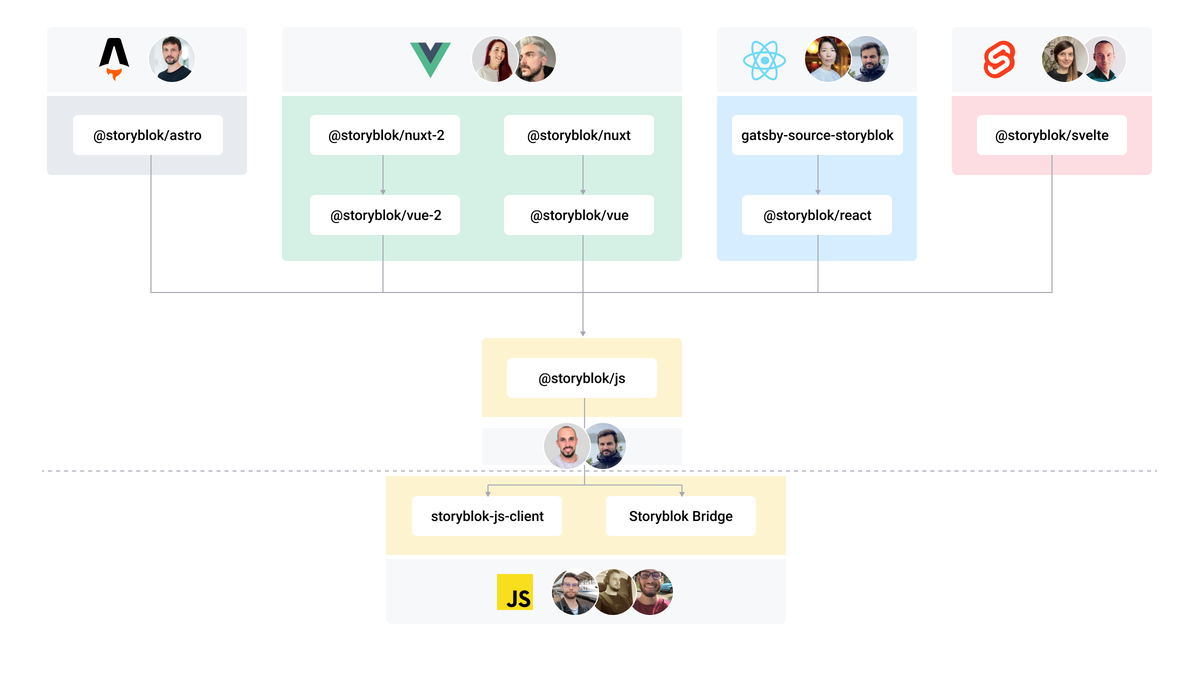
## The Storyblok JavaScript SDK Ecosystem
## 🔗 Related Links
- **[Add a headless CMS to Vue.js in 5 minutes](https://www.storyblok.com/tp/add-a-headless-CMS-to-vuejs-in-5-minutes?utm_source=github.com&utm_medium=readme&utm_campaign=storyblok-vue)**: Quick-start guide on getting up and running with Storyblok and Vue.
- **[Storyblok & Vue.js on GitHub](https://github.com/search?q=org%3Astoryblok+topic%3Avue)**: Check all of our Vue.js open source repos.
- **[Storyblok CLI](https://github.com/storyblok/storyblok)**: A simple CLI for scaffolding Storyblok projects and fieldtypes.
## ℹ️ More Resources
### Support
- Bugs or Feature Requests? [Submit an issue](/../../issues/new).
- Do you have questions about Storyblok or you need help? [Join our Discord Community](https://discord.gg/jKrbAMz).
### Contributing
Please see our [contributing guidelines](https://github.com/storyblok/.github/blob/master/contributing.md) and our [code of conduct](https://www.storyblok.com/trust-center#code-of-conduct?utm_source=github.com&utm_medium=readme&utm_campaign=storyblok-vue).
This project use [semantic-release](https://semantic-release.gitbook.io/semantic-release/) for generate new versions by using commit messages and we use the Angular Convention to naming the commits. Check [this question](https://semantic-release.gitbook.io/semantic-release/support/faq#how-can-i-change-the-type-of-commits-that-trigger-a-release) about it in semantic-release FAQ.
