# vue2-gmap-custom-marker
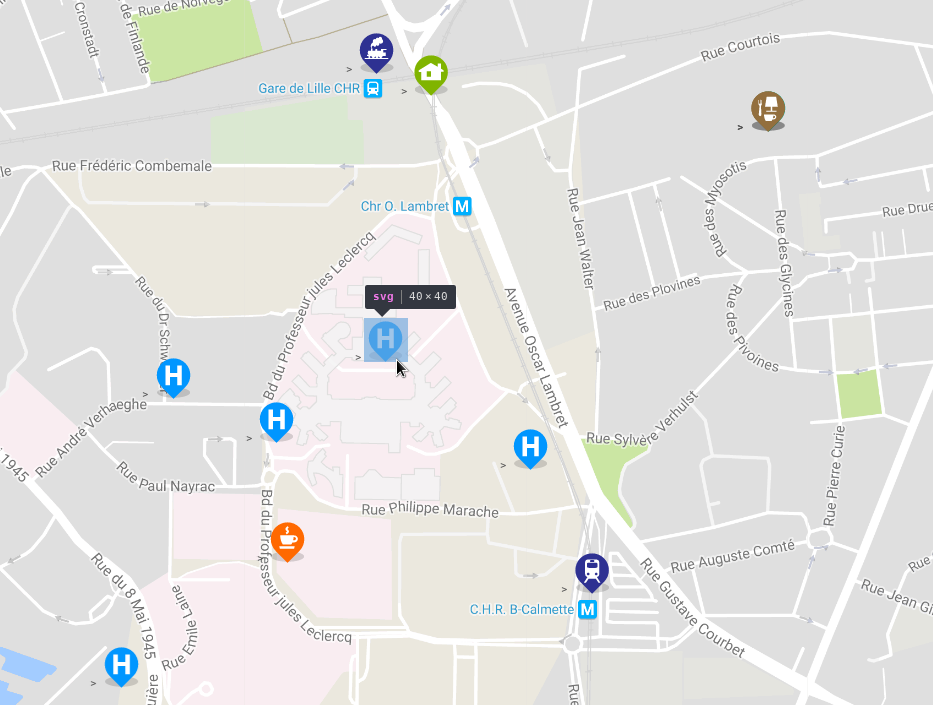
This component allows you to display custom HTML content on the map using Overlay.
This component is an adaptation of the Google Map V3 overlay code sample with some great ideas from [angularjs google map](https://ngmap.github.io/) from this [component](https://github.com/allenhwkim/angularjs-google-maps/blob/master/directives/custom-marker.js).
This project is a plugin for [vue-google-maps](https://github.com/xkjyeah/vue-google-maps).
# Demo
[Demo from gh-pages branch](https://eregnier.github.io/vue2-gmap-custom-marker/dist/)
## Example
# Installation
Install the package from [npm](https://www.npmjs.com/package/vue2-gmap-custom-marker):
`npm i vue2-gmap-custom-marker`
# Basic Usage
Import the component and use it in the components object.
```javascript
import GmapCustomMarker from 'vue2-gmap-custom-marker';
export default = {
[...],
components: {
'gmap-custom-marker': GmapCustomMarker
},
[...]
}
```
Use the custom marker inside the map component. Add HTML or other Vue components inside the custom marker to be rendered on the map.
```vue
 ```
Use the `@click` event with the `.native` modifier to bind a function to the clicking of the custom marker.
```vue
```
Specify the alignment of the marker with the `alignment` prop. Accepts 13 values: `top`, `bottom`, `left`, `right`, `center`, `topleft` | `lefttop`, `topright` | `righttop`, `bottomleft` | `leftbottom`, `bottomright` | `rightbottom`. Defines the alignment of the marker relative to the lat/lng specified, e.g. `bottomright` - the marker will be below and on the right of the location.
```vue
```
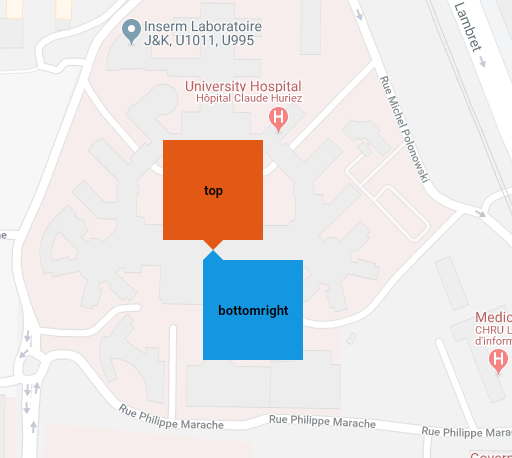
Manually specify an offset value for the marker in pixels with prop `offsetX` | `offsetY`. A positive `offsetX` moves the marker further right, and a positive `offsetY` moves the marker further down the page. Can be used with the `alignment` prop.
```vue
```
# Reference
**Prop**|**Type**|**Default**|**Description**|**Supported Values**
:-----:|:-----:|:-----:|:-----:|:-----:
`marker`|Object|`null`|Provide the latitude and longitude values that the marker should be displayed at. **Required**|Provide an Object with `lat` and `lng` properties. `{ lat: Number, lng: Number }`
`offsetX`|Number|`0`|The number of pixels to move the marker by in the x-direction. Postive values move the marker to the right|Positive or negative number.
`offsetY`|Number|`0`|The number of pixels to move the marker by in the y-direction. Postive values move the marker to down the page.|Positive or negative number.
`alignment`|String|`top`|The alignment of the marker element relative to the location it is displayed. e.g. `bottomright` - the marker will be below and on the right of the location.|`top`, `bottom`, `left`, `right`, `center`, `topleft` `lefttop`, `topright`, `righttop`, `bottomleft`, `leftbottom`, `bottomright`, `rightbottom`
`delayRepaint`|Number|`0`|Delay before the marker repaint is triggered. This is useful when the inner html is a component that renders asynchronously and where size can be only computed afterward : it prevent marker flickering.| Positive number.
# Licence
[MIT](https://en.wikipedia.org/wiki/MIT_License)
```
Use the `@click` event with the `.native` modifier to bind a function to the clicking of the custom marker.
```vue
```
Specify the alignment of the marker with the `alignment` prop. Accepts 13 values: `top`, `bottom`, `left`, `right`, `center`, `topleft` | `lefttop`, `topright` | `righttop`, `bottomleft` | `leftbottom`, `bottomright` | `rightbottom`. Defines the alignment of the marker relative to the lat/lng specified, e.g. `bottomright` - the marker will be below and on the right of the location.
```vue
```

Manually specify an offset value for the marker in pixels with prop `offsetX` | `offsetY`. A positive `offsetX` moves the marker further right, and a positive `offsetY` moves the marker further down the page. Can be used with the `alignment` prop.
```vue
```
# Reference
**Prop**|**Type**|**Default**|**Description**|**Supported Values**
:-----:|:-----:|:-----:|:-----:|:-----:
`marker`|Object|`null`|Provide the latitude and longitude values that the marker should be displayed at. **Required**|Provide an Object with `lat` and `lng` properties. `{ lat: Number, lng: Number }`
`offsetX`|Number|`0`|The number of pixels to move the marker by in the x-direction. Postive values move the marker to the right|Positive or negative number.
`offsetY`|Number|`0`|The number of pixels to move the marker by in the y-direction. Postive values move the marker to down the page.|Positive or negative number.
`alignment`|String|`top`|The alignment of the marker element relative to the location it is displayed. e.g. `bottomright` - the marker will be below and on the right of the location.|`top`, `bottom`, `left`, `right`, `center`, `topleft` `lefttop`, `topright`, `righttop`, `bottomleft`, `leftbottom`, `bottomright`, `rightbottom`
`delayRepaint`|Number|`0`|Delay before the marker repaint is triggered. This is useful when the inner html is a component that renders asynchronously and where size can be only computed afterward : it prevent marker flickering.| Positive number.
# Licence
[MIT](https://en.wikipedia.org/wiki/MIT_License)